For readers
Privacy & your data
Control whether your reading shapes recommendations, and download a copy of your data.
What you read is yours. BeeShelf uses it to make the library more useful to you, never to sell to anyone, and you can turn that off whenever you like.
Personalized recommendations
In the Privacy section of your Account, which you open from the profile chip in the top right, there’s a single switch: Personalized recommendations.
- Leave it on, and the app uses your borrowing to suggest books and to arrange the Discover constellation around your taste.
- Turn it off, and the app stops personalizing. You’ll see popular and general suggestions instead, and your reading isn’t used to shape them.
You can switch it off at any time, and back on later. Your library can also turn personalization off for everyone; if your suggestions look general no matter what, that may be why.
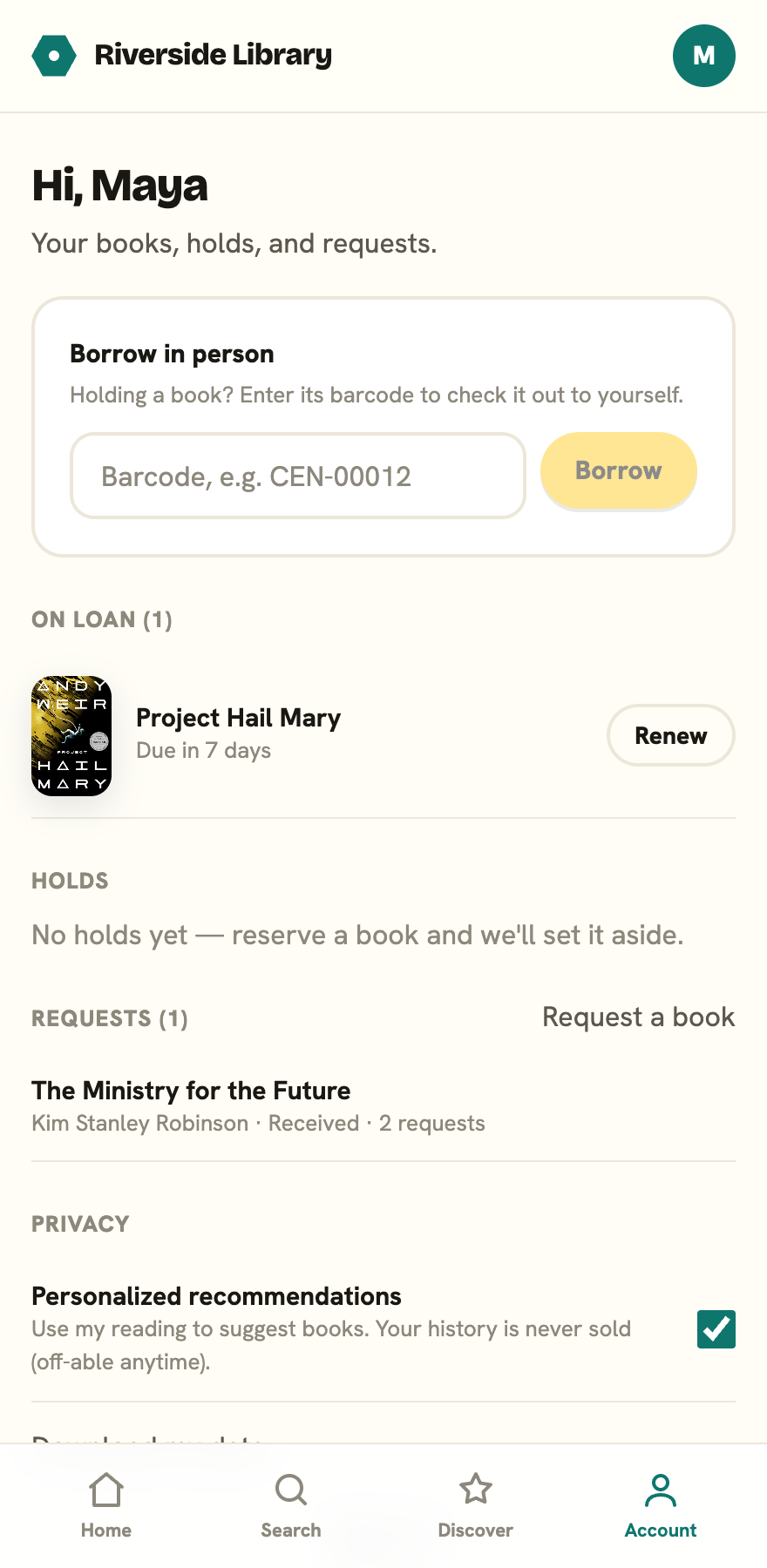
Download your data
Below the switch, Download my data saves a JSON file (my-library-data.json) with your account: your loans and reading history, your holds, your requests, and your taste profile (the subjects and authors you read most). It’s yours to keep, and a plain file you can open or move elsewhere.
What the library can and can’t see
Library staff can see what you currently have out and your holds, because they need to in order to run lending. Whether your past reading history is kept is a library-wide setting your administrator controls, and they can clear old history on a schedule. None of it is ever sold.