For admins
Lending rules & overrides
Set how long loans last, how fines work, and make exceptions per member category.
Lending rules decide how borrowing behaves: how long a loan lasts, how many a member can have, and whether overdue books cost anything. They live in the Settings tab, and you can change them yourself.
The default rules
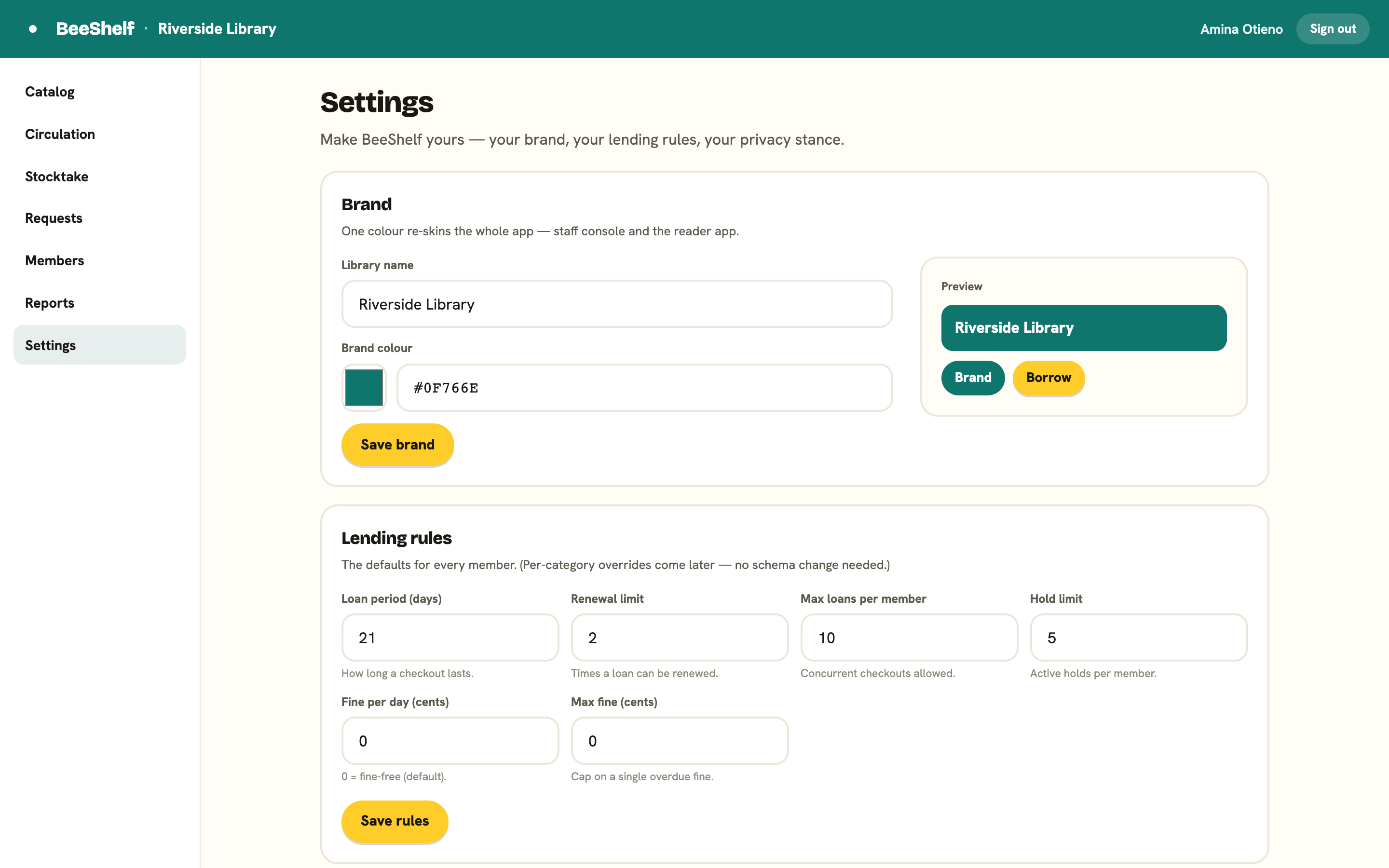
In the Lending rules card, set the defaults that apply to every member:
- Loan period (days): how long a checkout lasts.
- Renewal limit: how many times a loan can be renewed.
- Max loans per member: how many books someone can have out at once.
- Hold limit: how many active holds a member can have.
- Fine per day (cents): leave at 0 to be fine-free, which is the default.
- Max fine (cents): a cap on a single overdue fine.
Press Save rules when you’re done.
Per-category overrides
Some members should get different rules, for example staff getting a longer loan period than students. That’s what the Rule overrides card is for, and the most specific rule always wins.
To add an override:
- Choose the rule to change (for example loan period).
- Choose the category it applies to (for example Faculty).
- Type the value.
- Press Add.
Existing overrides are listed, each with a Remove button. Categories themselves are managed under Members. Because rules are matched by specificity rather than fixed columns, new kinds of rules can be added later without rebuilding anything.